01 · BARS
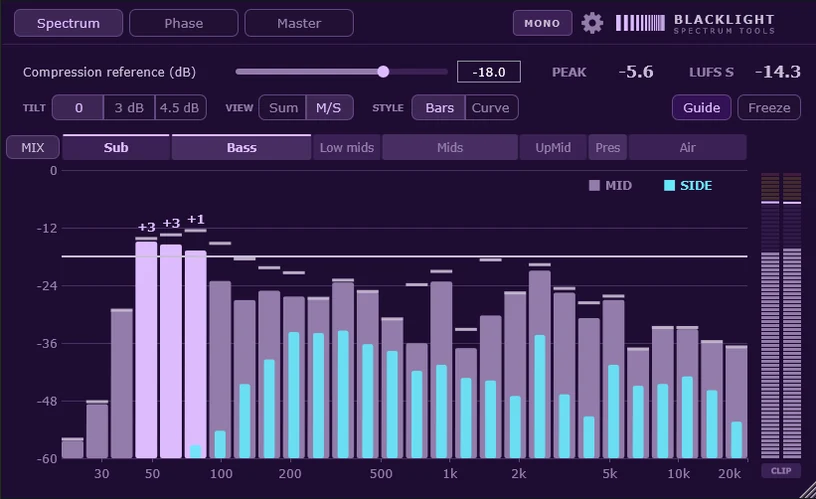
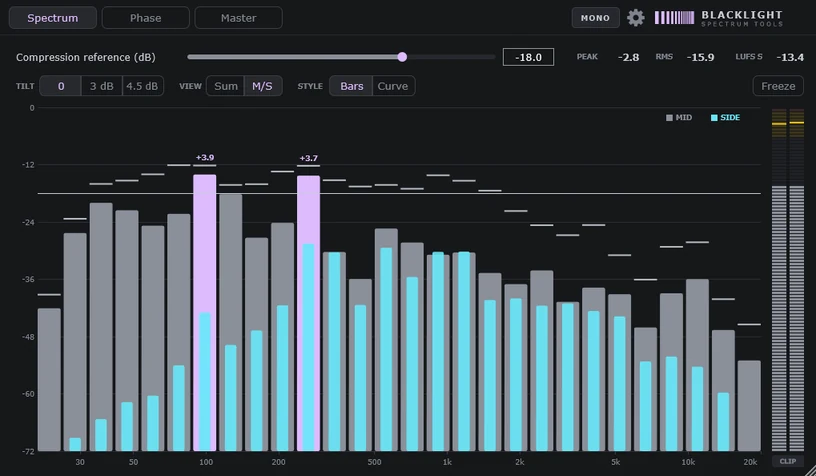
Every bar above your reference lights up and tells you by how much.
Move the reference line to where you want the compressor to work. Each band's +dB is how far it goes over: your threshold, no guessing.
Lyα · THE FIRST LINE
The spectrum analyzer that tells you how many dB each band passes your reference. It measures, explains and never changes your mix.
Calibrated: a −12 dBFS sine reads −12.
Of low-end detail: kick and bass show up as separate peaks.
To your audio. The MONO button is only for listening and turns off on export.
EVERYTHING IT DOES
Recorded in FL Studio on a real mix. What you see is what it does.
01 · BARS
Move the reference line to where you want the compressor to work. Each band's +dB is how far it goes over: your threshold, no guessing.
02 · GUIDE
The instrument's zones appear above the graph, picked automatically from the track name. Hover one: what happens with too much, too little, and how many dB it passes the reference.
03 · MID / SIDE
Side in cyan, band by band. Hover to see how many dB it sits below Mid and a clear verdict: Mostly mono, Stereo mono-safe or Wide - check in mono.
04 · PHASE WARNING
Red only when there's real risk, with what to check: polarity, L/R delay or a widener. Tuned not to fire on reverbs and pads.
05 · MONO BUTTON
Let go and you're back in stereo; right-click to lock it. The whole window gets a yellow frame so you don't forget. It's the only thing that touches the audio.
06 · ON A CHANNEL
On a vocal or a bus the tab becomes Loudness: no streaming table, just loudness to compare channels and headroom for the master.
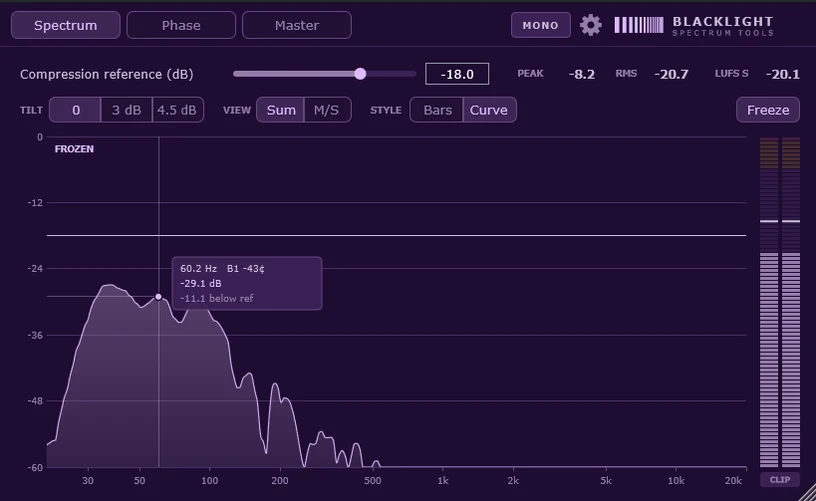
07 · HOVER READOUT
Hover to see the frequency, the musical note with cents and the level. The crosshair sticks to the signal, not the mouse, so you read the kick or the bass exactly.
08 · FREEZE
One click and the picture holds still while the meters keep running. Walk through the bands calmly and go back to live whenever you want.
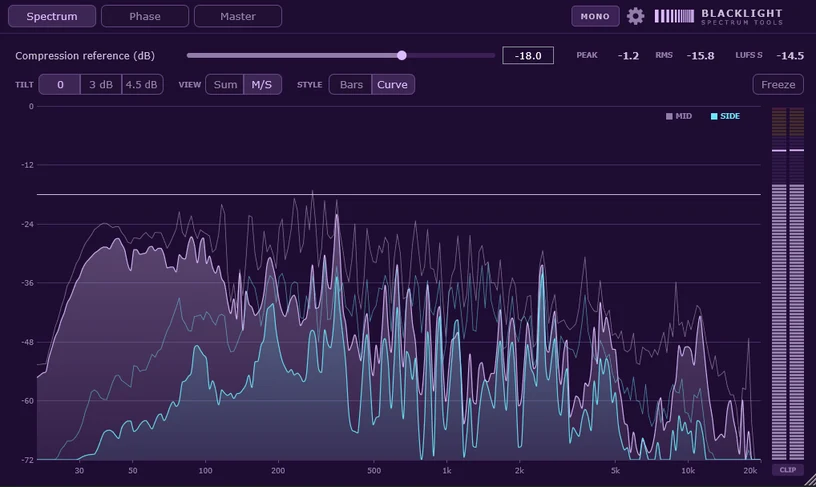
09 · CURVE AND HOLD
About 3 Hz of low-end detail, Fast, Normal or Slow averaging, and a thin line with each frequency's maximum across the whole song.
10 · ON THE MASTER
Integrated LUFS, True Peak with a clip counter, PLR to see if you over-compressed, and each platform's table.
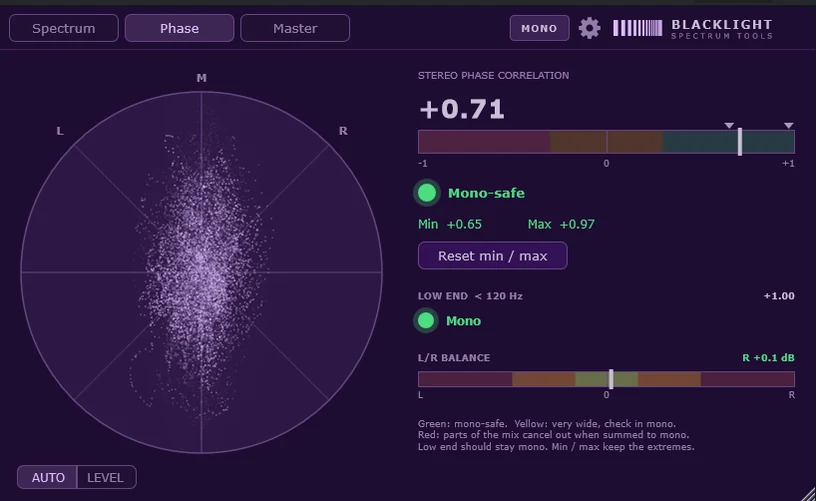
11 · PHASE TAB
Correlation with min and max, a mono check below 120 Hz and the left/right balance, with lights that explain what's going on.
12 · YOUR WAY
Blacklight, Graphite or Dim, colour-blind safe alerts and a large-readings mode for recording tutorials. Pick it in the gear menu.
INSTALL
From GitHub, the latest version. About 5 MB.
If Windows says "protected your PC": More info → Run anyway. It isn't code-signed yet.
Look for "Lyman Bar Analyzer" in your VST3 plugins and put it in the last slot of a channel or the master.
FAQ
Yes. No trial, no account and no expiry. There will be a Pro version with extras later, but what's free today stays free.
It's a VST3 for Windows, so it loads in any DAW that uses VST3: FL Studio, Ableton Live, Reaper, Cubase, Studio One and more. It's been tested mostly in FL Studio.
Not yet. The Mac version is on the plan; your support on Ko-fi helps pay for what it takes to release it.
No. It only measures. The MONO button changes what you hear while you hold it, and it never stays on when you export or open a project.
Lyman measures whatever reaches it. In the last slot you see what leaves the channel; before a compressor, what the compressor receives. With two instances you compare before and after.
Put it where you want the compressor to start working. Each bar's +dB is how far that band goes over: that's how you pick the threshold and which band to compress.
It tilts the graph so a balanced mix looks flatter. Use 0 to set a threshold or look at a solo instrument, and 3 or 4.5 to check tonal balance; SPAN ships with 4.5.
It has both. Bars are for deciding (how many dB, which band) and the curve is for comparing shapes, like in SPAN.
Very little: around half a percent of one core per instance, and about one percent with the curve on screen. With the window closed it doesn't compute the curve.
Because the installer isn't code-signed yet. Click More info and then Run anyway. Signing it is the current Ko-fi goal.
On GitHub, in the Lyman repository, use Watch → Custom → Releases and you'll get an email with every version. To update, install over the old one: your projects and settings are kept.
Yes, it's a plugin parameter. In FL Studio use Link to controller and assign it to a pad: holding it down is listening in mono.
Signing removes the Windows warning. The Mac version comes next.